
BärGPT is more than just another AI chatbot – it’s a tailor-made tool for Berlin’s public administration. In this article, we’d like to give you a glimpse under the hood and show you which technical decisions and challenges were behind the development. From architecture and tool calling to scaling for potentially tens of thousands of users, we provide insights into practical implementation. In this technical deep dive, you will learn how we combine proven AI technologies with the specific requirements of administrative work.
Working with documents
When developing BärGPT, our primary focus was on making it easier to work with documents. With our tool Parla we had already processed a large volume of documents from the Berlin House of Representatives, we knew that the underlying technology used there, “Retrieval Augmented Generation” (RAG), would be a useful starting point for BärGPT, as we had already demonstrated that RAG can scale to many thousands of documents and respond to queries quickly and accurately.
The difference for us was to create a tool to help Berlin civil servants in their everyday work, rather than just building a search platform. To achieve this, we based our early development on a familiar metaphor – that of a desktop interface for storing documents. This is a key difference between BärGPT and comparable chatbots. With chatbots, you can upload documents within a chat. However, these disappear when a new conversation starts or when the website is open the next day. In administrative work, however, the same documents are used over a longer period of time. To avoid constant repeated uploading, we therefore opted for persistent document storage, including optional folders for better sorting. From there, users can add the files to the chat at any time and use them for further work.
Sometimes, however, you don’t need a document as a reference, but have a more general request, such as writing an email on a specific topic. We also support this function, unlike other AI applications that are specifically designed for public administration and that only offer rigid buttons for summaries or other similar requests. Our numerous user tests have shown that a significant number of administrative staff understand how to use AI chat tools intuitively and can often draw on their personal experience with similar AI products. For all users who are gaining their first experience with an AI assistant with BärGPT, we also have created extensive help and training material – from step-by-step video tutorials to a classic manual and FAQs
Tool calling
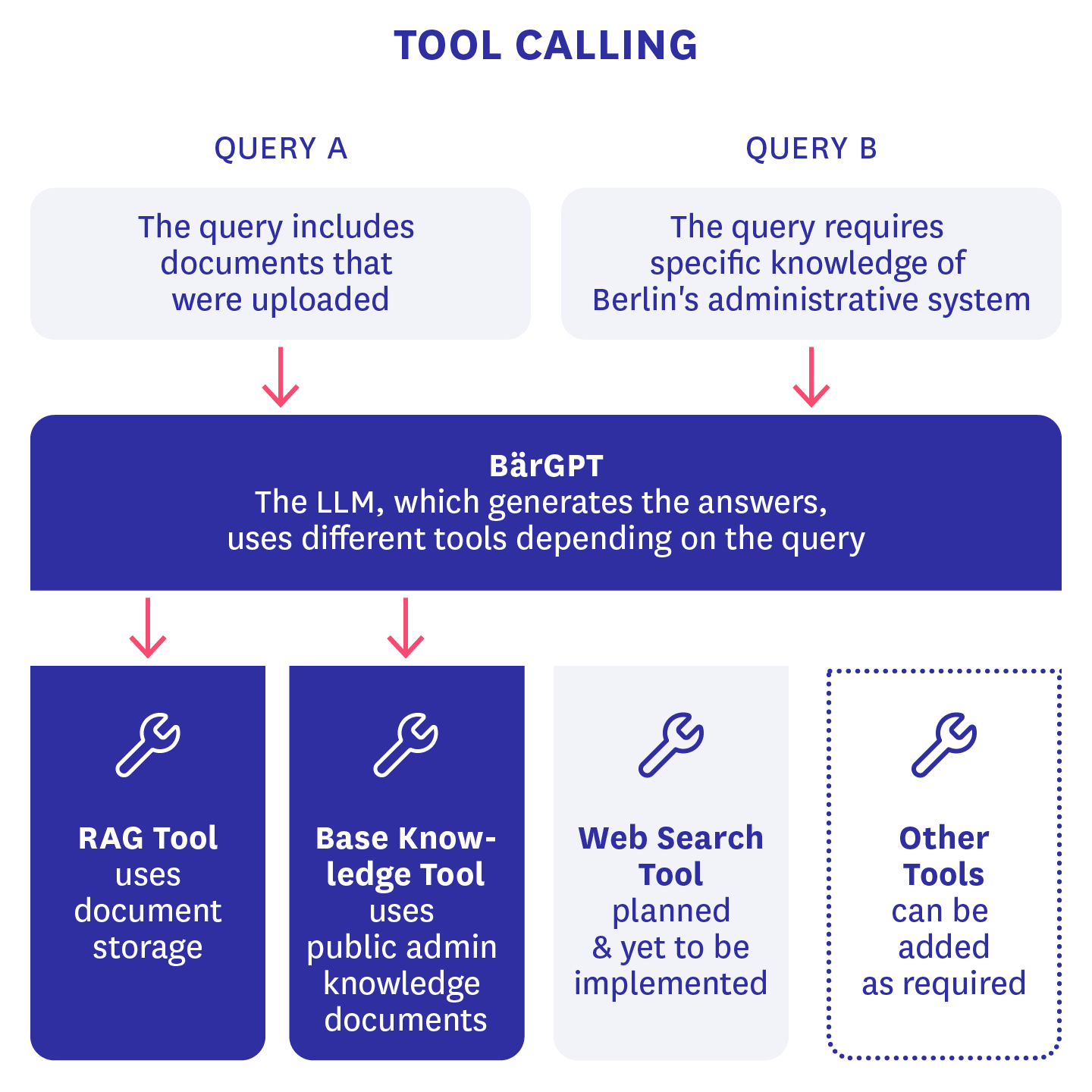
To expand the functionality of BärGPT beyond a simple chatbot with RAG connectivity, we have incorporated tool calling as a feature. This means that the large language model (LLM) that generates BärGPT’s responses has a list of functions at its disposal that it can execute under certain conditions. We have built our own tool based on the original RAG chat, which used to be always active when documents were added to the chat. In addition, there is also a basic knowledge tool that the AI model can use independently if it “suspects” that the answer being sought requires special knowledge about the Berlin public administration that goes beyond the training data of the LLM. In this case, a RAG search is started on a specific set of documents previously uploaded by administrators that could be relevant to all users of BärGPT.
The big advantage of this architectural decision is that this “toolization” will make it easy to add further features to BärGPT in the future, such as web search, and theoretically also allow end users to switch the tools on and off themselves. The lack of a web search function in particular has forced us to get creative with the design of our system prompts for the time being. To prevent false information about current events and public figures, BärGPT currently refers to a conventional internet search until we have integrated this function ourselves.
Sources and structured outputs
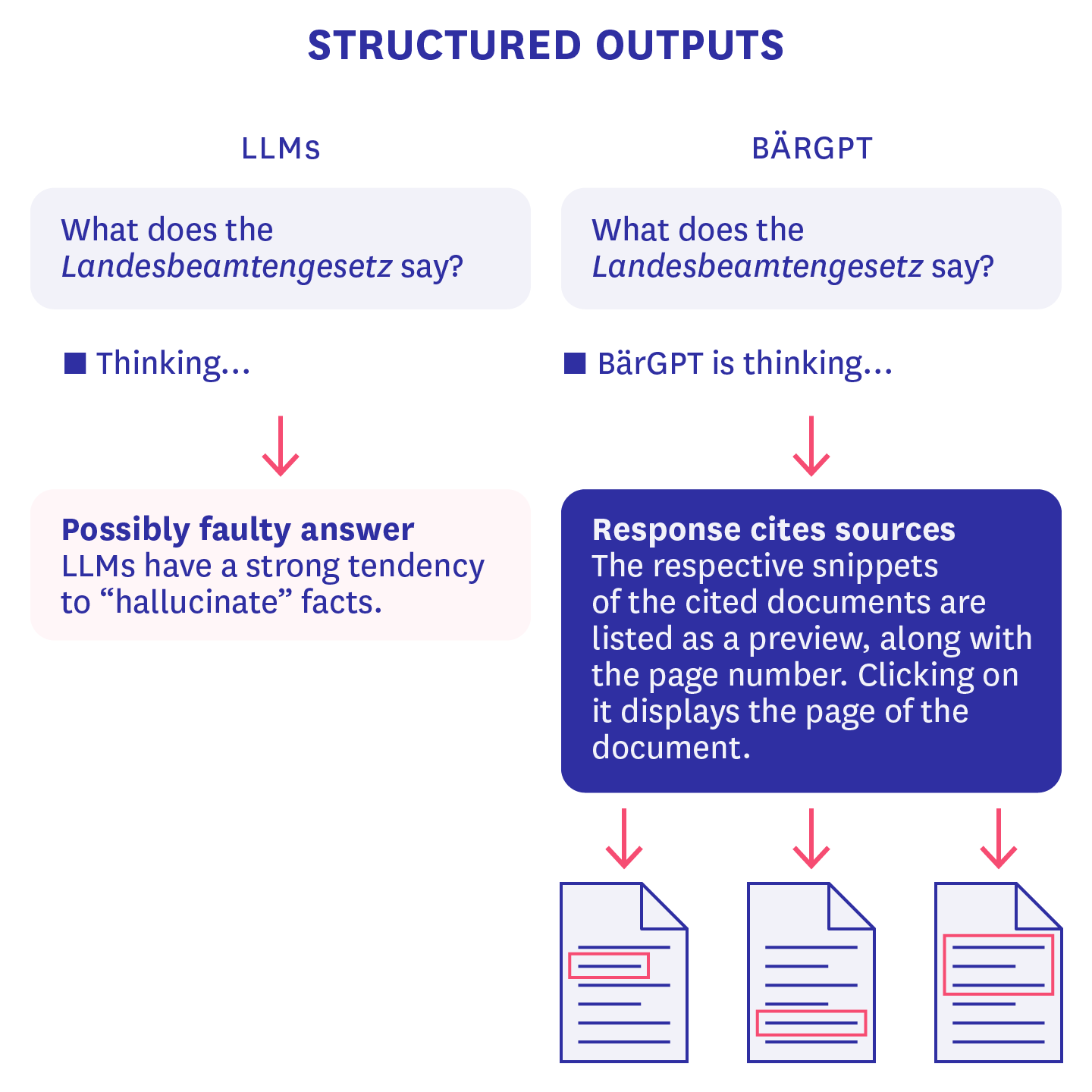
Another feature that was often requested in our tests are sources and references, as LLMs have a strong tendency to “hallucinate” facts, i.e., to generate falsehoods and present them as truth. To do this, we use relevant quotes from specified files in combination with the technique of “structured outputs.” As a result, the LLM behind BärGPT generates not only a single coherent text, but also a JSON object that contains both the text response to the user’s query and a list of IDs corresponding to text sections used to generate the response. This structured object is also streamed. This means that the first words of the response are already visible before the object as a whole has been returned by the LLM provider’s API. In rare cases, this can result in part of the JSON object not being generated correctly, for example because a closing bracket is missing, and as a result the source list cannot be displayed. However, we are confident that future AI model versions will have this problem even less frequently and that we will be able to further reduce these generation errors iteratively by making adjustments to the system prompt.
Self-hosting of parts of the infrastructure
Since we wanted to give as many people as possible access to BärGPT in our trial operation while ensuring maximum data security and GDPR compliance, we searched for good hosting solutions. For this reason, we moved our database to a German BSI C5-certified cloud infrastructure. In doing so, we managed to replicate our production and development database setup, ensure that connections to the database are secure, and continue to use it to verify our users. We hope that the hardware we have chosen will be able to withstand the large, expected rush on BärGPT, and we will closely monitor the volume of requests in the initial weeks to ensure that everyone can use the service with as little delay as possible.
Scaling and stress tests
Since we expect tens of thousands of users for BärGPT as an AI assistant for the Berlin public administration, we have correspondingly higher requirements for scaling and availability than for our previous prototypes. That’s why we tested some critical parts of our infrastructure for scalability. To do this, we raised the request limits of our API providers as much as possible and also developed an internal queue in case these limits were insufficient, so that requests could at least be executed with a slight delay instead of failing. We also carried out various optimizations in terms of processor and memory usage on our backend and activated automatic scaling.
We then put the whole thing through its paces with stress tests, gradually unleashing virtual users with sample documents and requests onto our test environment using the well-known k6 software library.
Challenge: Slow document processing
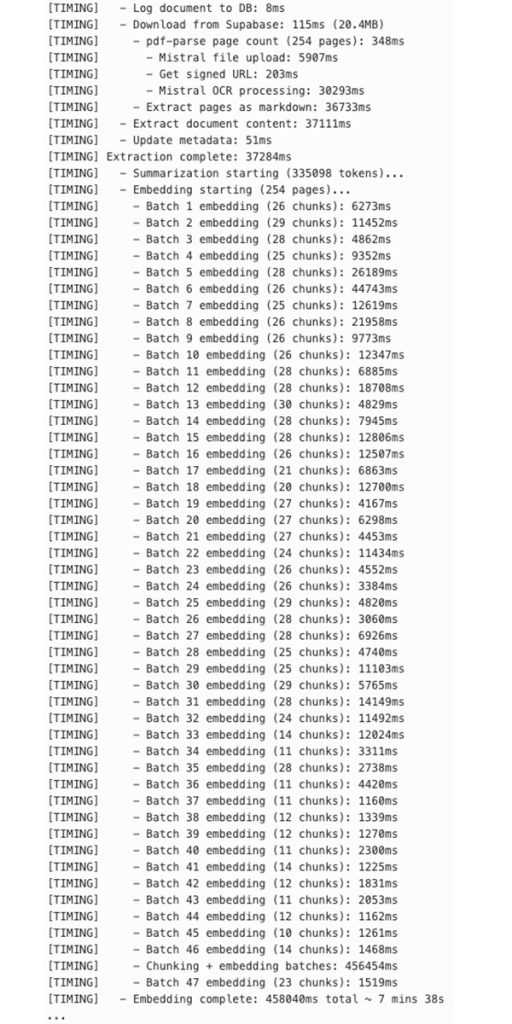
We encountered a particularly interesting challenge when processing large documents with a lot of text content. At times, this took almost 10 minutes for a file of approximately 20 MB. The largest part of this was creating the embeddings for the individual text sections. What exactly took so long here?
We use markdown-based chunking for text sections. This means that we first divide the text at markdown heading elements and then at section boundaries to generate text sections or “chunks.” If these are too large for the embedding model, they are recursively divided into smaller units: first into lines, then sentences, and finally words. These units are strung together until the token limit is exceeded. Then the character string from the previous iteration is used to generate chunks. In the old implementation, we then generated batches of chunks that together fell below the token limit. Processing such a batch can take varying amounts of time – from a few seconds to over 20 seconds.
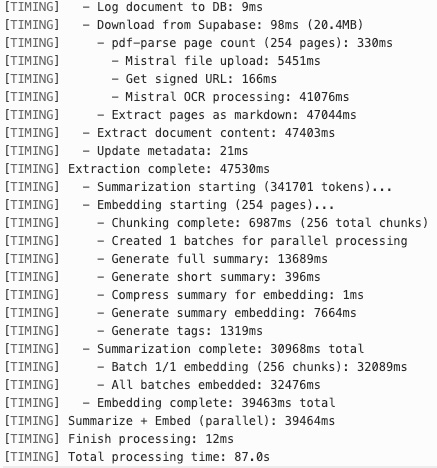
This sequential processing of batches was inefficient because the individual chunks were completely independent of each other. We therefore parallelized this process after discovering that we could send not just one batch per request, but 512 batches per request via our embeddings API. In addition, we implemented the summary generation of the document, which can take several seconds depending on its size, in parallel with the creation of the embeddings. This saved a significant amount of time, so that the same large PDF was now fully processed in less than two minutes.
Here are a few logs that show the timings:
The Architecture
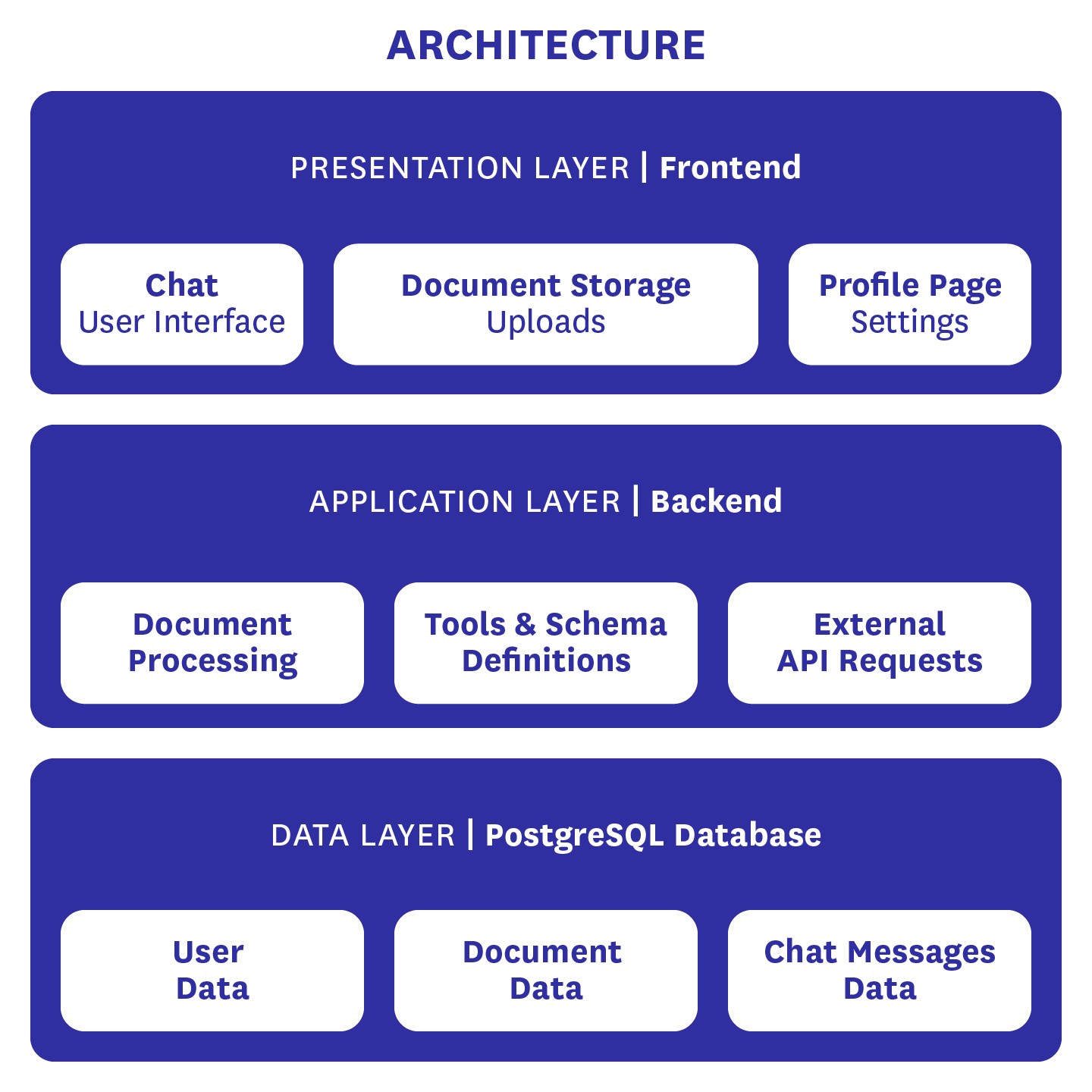
As can be seen in the architecture diagram, the data basis of BärGPT is a Supabase instance that contains a PostgreSQL database and provides several additional functions. These include user authentication and the email templates we use to generate emails. The Postgres database itself contains user data such as first and last name, email address, encrypted password, and optionally the person’s title and salutation. It also contains all document data, from the original document to the extracted text, the embeddings generated from it for RAG searches, summaries of the files, and other metadata. Finally, it also contains the chat histories of BärGPT users so that old chats can be accessed at any time.
Our backend primarily handles external API requests, such as those to our LLM or our embedding provider. It also processes documents, enabling interaction with uploaded files. Finally, it defines the tools and output schemas we use and makes them available to the LLM.
Our frontend is responsible for everything that can be seen on our website. This includes the chat interface, document storage, including the upload function for new documents, and the profile page. On the latter, personal data and passwords can be changed. In addition, users can see which basic documents they currently have access to and can choose whether they want to be addressed formally or informally. For administrators, there is an additional view where new basic knowledge documents can be uploaded. This view is currently reserved for CityLAB developers. However, we plan to give individuals from certain institutions access to it in the future so that they can fill in the basic knowledge for their respective institution or department.
Want to stay up to date? More updates on BärGPT are available on our blog and in the public BärGPT help center.